 |
| Comparison of the tritium torch (left) with an ordinary tritium zip marker (middle) and an americicum powered self-illuminating keychain (right) |
Sunday, 24 February 2013
Outdoor: Tritium Torch

Monday, 28 January 2013
Survival: Evolution Of Fire Making
I'am very interested in friction fire making and since a couple of years I also managed to improve and miniatureize my bow drill fire set. So Here's my personal evolution in bow drill sets:
One of my first bow drill sets (2008) consisted of an simple socket and drill made from beech and a bow made from hazel. The fireboard was soft wood collected in the nearby forest. The bow was approximately 60 cm long.
 |
| One of my earliest bow drill friction fire sets |
 |
| A more elaborated friction fire set |
 |
| miniaturized bow drill friction fire sets |
 |
| A decorative bow drill set |
The vital parts of my recent (2012) set is made almost completely from lignum vitae. The drill is hazel and the fire board is made from red cedar wood. A thin piece of manilkara serves as fire pan. More and more I'am tending to leave the bow at home, since a straight branch for a bow is to be found almost everywhere and the very short bow (20 cm) is sometimes hard to handle (e.g. when you want to make fire after a long hike).
 |
| A bow drill friction fire set made from lignum vitae |
Lignum Vitae Paper Knive
 |
| Lignum vitae paper knive with bocote handle |
 |
| Lignum vitae paper knive |
Saturday, 5 January 2013
Bloomery: Goat Skin Bellows
 |
| The goat skins, already sewed to two bellows. |
 |
| The prepared air nozzles and air inlet. |
 |
| The almost completed bellows. |
 |
| The air inlet |
 |
| The wind pipes made from plant stems (japanese knotweed). |
 |
| The finished goat skin bellows. |
 |
| The goat skin bellows in operation. |
Thursday, 3 January 2013
Lyx 2.0 (LaTeX): Using the angewandte style with BibLaTeX, or how to make grouped citations.
I tried for a long time to generate a proper angew. chem. citation style with good old BibTeX. Currently there is no style-file for bibtex available, which will result in a 100% correct output. Especially the problem with grouped citations in one entry, i. e. multiple references should be cited as a single one and listed as a single block in the bibliography. That's crucial for the citation of articles published in the german angew. chem and english angew. chem. Int. Ed., respectively. Grouped citations are impossible, or at least, very hard to make with bibtex.
Luckily the BibLaTeX package provides the possibility to make grouped citations. The grouped citations are called ‘entry sets’ or ‘reference sets’ in the biblatex documentation. To use biblatex, angew. chem citation style AND grouped citations with Lyx 2.0, you first have to write the following commands in the latex preamble:
\usepackage[natbib=true, citestyle=numeric-comp, style=chem-angew, backend=biber, hyperref]{biblatex}
\usepackage{hyperref}
%you can change the bibliography title by:
\defbibheading{head}{\chapter{my title}}
%the bibliography is loaded by:
\bibliography{
mybib1,
mybib2,
%....and so on
}
I get biblatex to work only with absolute paths of my .bib files like "C:/folder/mybib1".
The bibliography processor has to be set to "biber" and "natbib" with "author-year" format.
Include the bibliography by typeing in a TeX command box
\printbibliography[]
% if you changed the bibliography title you have to define [heading=head]
You may also include the bibliography in your document as a Lyx-note if you wish to use the Lyx internal citation function ("plain" format).
For generating grouped citations you have to define them at the very beginning of your text body:
\defbibentryset{key1}{entry1,entry2}
The entrys are, let's say, Miller2008 and Miller2008b or as whatever the references are named in your .bib file.* So if you want to cite both of them as a grouped citation, you write in a TeX box:
\defbibentryset{Miller}{Miller.2008,Miller.2008b}
The key {Miller} is used to cite the whole entry (i.e. Miller.2008 AND Miller.2008b). You have to cite the entry within the text by a TeX command:
\autocite{Miller}
%or \supercite{Miller} which will give the same result
Within the compiled text {Miller} appears as [1] and in your bibliography as
[1] (a) ...... ; (b) ......
If you wish to cite only Miller.2008b, you simply write:
\autocite{Miller.2008b}
In the compiled text it appears as [1b]
*I'm using Citavi with the BibLaTeX export option to generate my bib files.
Luckily the BibLaTeX package provides the possibility to make grouped citations. The grouped citations are called ‘entry sets’ or ‘reference sets’ in the biblatex documentation. To use biblatex, angew. chem citation style AND grouped citations with Lyx 2.0, you first have to write the following commands in the latex preamble:
\usepackage[natbib=true, citestyle=numeric-comp, style=chem-angew, backend=biber, hyperref]{biblatex}
\usepackage{hyperref}
%you can change the bibliography title by:
\defbibheading{head}{\chapter{my title}}
%the bibliography is loaded by:
\bibliography{
mybib1,
mybib2,
%....and so on
}
I get biblatex to work only with absolute paths of my .bib files like "C:/folder/mybib1".
The bibliography processor has to be set to "biber" and "natbib" with "author-year" format.
Include the bibliography by typeing in a TeX command box
\printbibliography[]
% if you changed the bibliography title you have to define [heading=head]
You may also include the bibliography in your document as a Lyx-note if you wish to use the Lyx internal citation function ("plain" format).
For generating grouped citations you have to define them at the very beginning of your text body:
\defbibentryset{key1}{entry1,entry2}
The entrys are, let's say, Miller2008 and Miller2008b or as whatever the references are named in your .bib file.* So if you want to cite both of them as a grouped citation, you write in a TeX box:
\defbibentryset{Miller}{Miller.2008,Miller.2008b}
The key {Miller} is used to cite the whole entry (i.e. Miller.2008 AND Miller.2008b). You have to cite the entry within the text by a TeX command:
\autocite{Miller}
%or \supercite{Miller} which will give the same result
Within the compiled text {Miller} appears as [1] and in your bibliography as
[1] (a) ...... ; (b) ......
If you wish to cite only Miller.2008b, you simply write:
\autocite{Miller.2008b}
In the compiled text it appears as [1b]
 |
| That's how the references are cited within the text... |
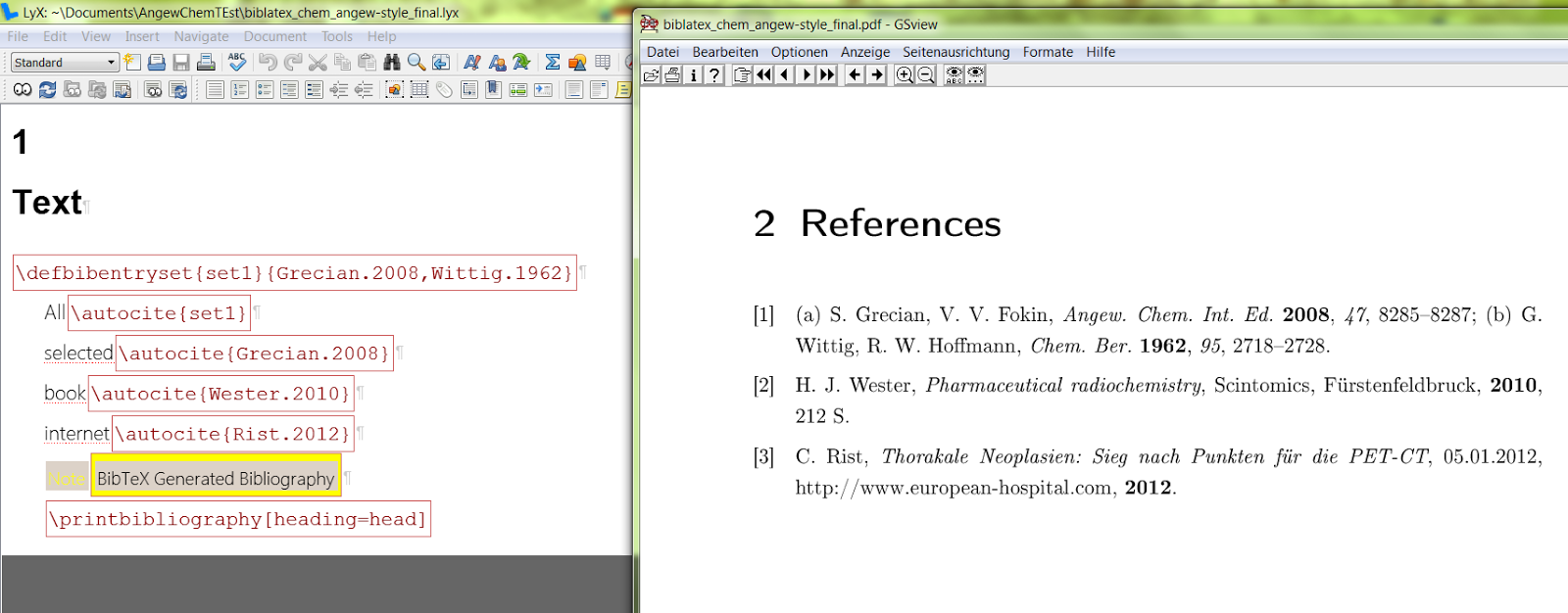 |
| and the bibliography itself. |
Friday, 7 December 2012
Lyx 2.0 (LaTeX): How to export from Lyx (2.0.5 Win7) to MS Office (2010)
Lyx 2.0 (LaTeX): How to export from Lyx (2.0.5 Win7) to MS Office (2010)
I assume you've Phyton 2.7 and Elyxer installed (they should be installed by default).
1# Go to Lyx Preferences/File Handling/File Formats: Choose "HTML (Word)"
Set active: "Document format", "Show in export menu"
Choose Short Name: "wordhtml"
Choose Extension: "html"
Set Editor and Viewer: "None" (or a program of choice)
Copier: "python -tt $$s/scripts/ext_copy.py -e html,png,jpg,jpeg,css $$i $$o" (Without " ")
Set Output Format: "PDF (pdflatex)".
2#Switch to Entry "Converters", Choose "Lyx->HTML (MS Word)"
Set From format: "Lyx" and To format: "HTML (MS Word)"
Write in "Converter": "python -m elyxer --html --directory $$r $$i $$o" (Without " ")
Enable "Converter File Cache".
3# Now you should be able to export (File/Export/HTML (MS Word)) your document to HTML. (There is a known clash with \xdefinecolor if you have enabled "change tracking" + "show in output" and \definecolor without O_o)
4# The HTML Document can be opened by MS Word and looks quite good. There's only a minimal polishment needed with Hyperlinks and \ce environment.
 |
| The file formats settings. |
 |
| The converter handling options. |
Thursday, 6 December 2012
Lyx 2.0 (LaTeX) Nomenclature as numbered chapter/section
Lyx 2.0 (LaTeX): How to set nomenclature as numbered section:
%Nomenclature
\usepackage{nomencl}
\let\abbrev\nomenclature
\renewcommand{\nomname}{Abkürzungsverzeichnis}
\setlength{\nomlabelwidth}{.25\hsize}
\renewcommand{\nomlabel}[1]{#1 \dotfill}
\setlength{\nomitemsep}{-\parsep}
\makenomenclature
%...with number
\usepackage{etoolbox}
\makeatletter
\patchcmd{\idx@@heading}{\chapter*}{\section}{}{}%<= or \chapter*... \chapter
\patchcmd{\thenomenclature}{\chapter*}{\section}{} {}% dito
\makeatother
Subscribe to:
Posts (Atom)